Lock Screen Affirmations: 20 Examples You'll Actually Believe
Short affirmations to see every time you pick up your phone, with a small action for each one so the words connect to your day.
A lock screen affirmation is a short, encouraging sentence you see every time you pick up your phone. The ones that help most are easy to believe and point to something you can do. “I can take one small step” is more useful on a hard day than “Everything is perfect.”
Below are 20 examples, each paired with a small action. Choose one that fits something happening in your life right now.
Why some affirmations feel hollow
If an affirmation is far from how you feel, reading it can make the gap more obvious. In one study, people with low self-esteem who repeated “I am a lovable person” felt worse afterward, not better. People who already felt good about themselves felt slightly better.
That doesn't mean affirmations can't help. It suggests three things to look for:
- Choose words you can believe today. “I'm learning to rest” is easier to accept than “I am always calm.”
- Connect the words to a moment. An affirmation is more useful when you know when you'll need it.
- Pair it with an action. Encouragement helps you start. A small action gives you something to do next.
When an affirmation also tells you how to act, it starts to work like an intention. For more on the difference, see affirmations, goals, and intentions.
20 lock screen affirmations
Each example has an action you could try today. Change the words until they sound like you.
For hard days
- 01
I can take one small step.
Pick the smallest part of what you're avoiding and do only that.
- 02
I've handled hard things before.
Think of one time you got through something difficult. What helped then?
- 03
This feeling will pass.
Name the feeling to yourself, then take three slow breaths before you decide what to do.
- 04
I'm allowed to start again.
If the morning went badly, choose one thing to do well this afternoon.
- 05
I don't have to do this alone.
Send one message asking someone for help or company.
For work
- 06
I'm capable of learning this.
Write down one question you need answered, and ask it today.
- 07
My best is enough for today.
Choose a time to stop working, and stop when it arrives.
- 08
I can focus on one thing.
Close your inbox while you work on the first part of a task.
- 09
My ideas are worth sharing.
Say one thought out loud in your next meeting.
- 10
Done is better than perfect.
Send the draft you've been polishing, with a note about what you'd like feedback on.
For relationships
- 11
I choose to be present.
Put your phone in another room during your next meal with someone.
- 12
I can listen before I answer.
Ask one follow-up question before you share your own view.
- 13
I'm a patient parent, and I'm still learning.
When you feel your temper rise, pause and lower your voice.
- 14
I can say no kindly.
Turn down one request you don't have time for, and offer another option if you can.
- 15
The people I love know I care.
Tell one person something specific you appreciate about them.
For taking care of yourself
- 16
My needs matter too.
Keep ten minutes of your day for something you enjoy.
- 17
I'm allowed to rest.
Leave one nonurgent task for tomorrow and use that time to wind down.
- 18
I speak to myself with care.
After a mistake, describe what happened the way you would to a friend.
- 19
I'm making progress, even if it's slow.
Write down one thing you did today that you couldn't do a month ago.
- 20
My body deserves movement.
Take a short walk, even if it's only around the block.
How to set up a lock screen affirmation
Once you've chosen your words, you have two main options:
- A wallpaper with your affirmation on it. You can make one for free with Notes and a screenshot.
- A widget below the clock. This keeps the text small but lets you change it easily.
For step-by-step instructions, see how to put text on your iPhone lock screen.
A few tips for readability:
| Tip | Why it helps |
|---|---|
| Stay under about eight words | You can read it in one glance. |
| Use high contrast | Busy photos make light text hard to read. |
| Place it below the clock | The top holds the time, and the bottom has the flashlight and camera buttons. |
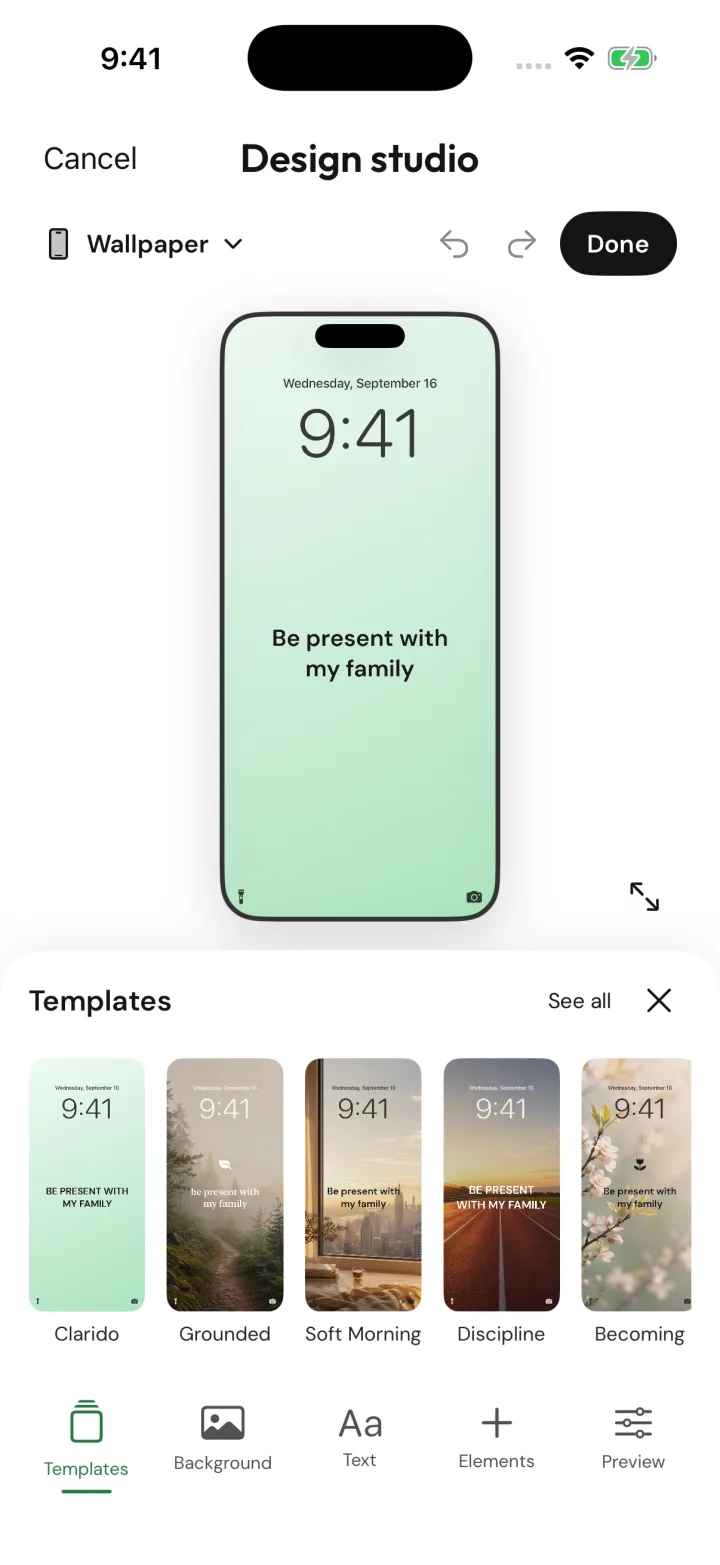
See your words before you set them.
Clarido's design studio shows how your words will look on your lock screen, with templates you can adjust.
Clarido sample content · Tap screen to enlarge.
Check whether it's helping
After a week, ask yourself:
- Did I notice the words when I picked up my phone?
- Did they change anything I did?
- Do I still believe them?
If you've stopped noticing them, change the wording or the design. If they don't feel true, choose something closer to where you are now. If they helped, keep them.
Lock screen affirmations with Clarido
Clarido helps you find words that fit your life, not a generic list. You talk through what's going on, and the coach helps you shape it into one intention you can carry through the day.
You can add it to your lock screen as a free widget, or design a full wallpaper with Clarido Premium. A daily check-in asks whether you showed up for it, so you can tell whether the words are helping and change them when they're not.
Get the next essay
Occasional articles on choosing what matters and returning to it. Unsubscribe anytime.